
3 Ways to Boost Energy Efficiency
February 10, 2012Dynapar HS35R Encoder General Description
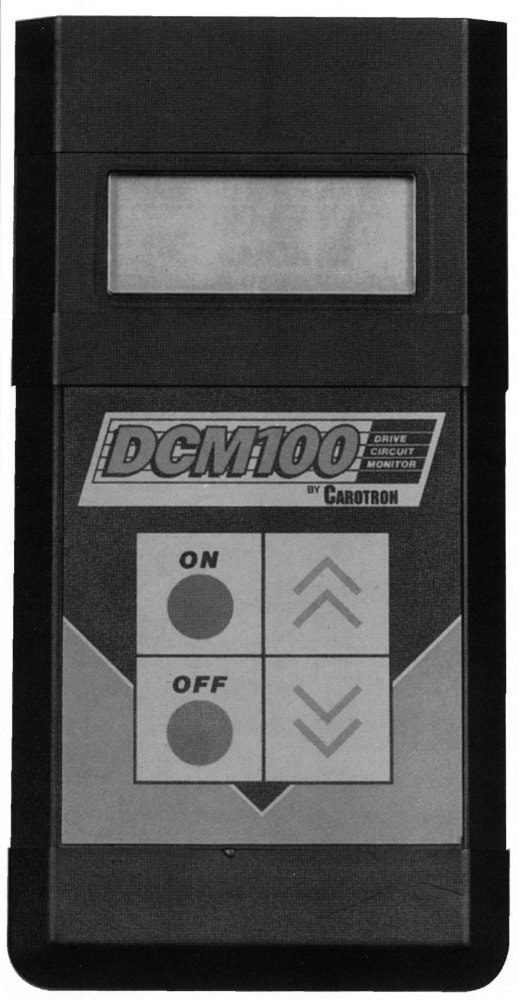
February 22, 2012Save Time when Troubleshooting DC Drives with Carotron's Drive Circuit Monitor
Common DC Drive Problems
If you’re unsure how to troubleshoot a DC motor, our monitoring device simplifies the process. There are many different issues that can arise with a DC drive. It’s important that you understand these issues so you know what to look for if any arise.
Some of the most common DC drive problems include driver inhibitors. In many cases, outside forces can inhibit the functioning of your DC drive. Before you start looking into problems with the drive itself, it’s important to rule out other common factors that may be keeping your drive from running the motor. Potential issues can include:
- Poor power supply connection: If you have a voltage or current issue with your drive, the device may not be receiving the power that it needs. This can inhibit your drive and prevent it from running the motor.
- Faulty connection with motor: Keep in mind that your issue could involve the motor itself rather than the DC drive. Check factors like wires, motor relays and connectors to find the source behind your malfunction.
- Weak command signal: If your DC drive has stopped running the motor, it may be the result of a faulty command signal. Before searching for issues with the drive itself, make sure that it’s receiving the command signal to start up the motor.
Once you’ve determined whether your DC drive issue is power supply-based or motor-based, it may be time to check for drive defects or other factors that can damage the device. Drive damage can cause breakers and fuses to blow out — and in some cases, it may be permanent and call for a full repair or replacement.
Grounded motor winding, poor signal isolation and unbalanced armature amps are a few common problems that can indicate that your driver needs repairs. Other issues with the DC drive include:
- Dirty line voltage: Without clean line voltage, some drives may have a harder time operating properly.
- Overloading: Overloading can create extreme stress for a drive, which can lead to safety issues and system failure.
- Drive wiring: Some drives are susceptible to damage if the wiring is defective or arranged improperly.
Three Important Elements of Troubleshooting
Even when using a handy tool such as the Drive Circuit Monitor to troubleshoot a DC drive, there are three important elements that should not be ignored.
1. Troubleshoot the Entire Application First
Before testing the DC drive, check each aspect of the application and all related equipment, motors, etc. Sometimes, it’s the load that’s causing problems with the drive, or the external controls such as push buttons, interlocks, digital controls, etc. In a nutshell, make sure it is actually the DC drive that’s malfunctioning to avoid wasting time and money.
2. Read the Manual
DC drives usually come with a very detailed instruction and/or service manual showing how the drive was built and wired. Manuals often have prints showing the schematics for the control, power/trigger, fuse, IFB and relay boards. There are also diagrams for wiring and connections. Manuals will feature other helpful information, including drive programming and calibration details, component testing information, detailed specs and troubleshooting hints. Studying the manual first will also help you be able to decode messages related to the failure and possibly identify the problem right away.3. Safety
Take measures to ensure electrical and mechanical safety when troubleshooting DC drives and motors. Though you might try to do some of the troubleshooting with the drive and/or motor powered off, it’s likely that you will have to do most of the testing with the power on. Use warning signs, proper lock-out procedures, and tape off the area where the machine is being tested to prevent harm to other employees. Always take a voltage reading with a verified meter before doing any hands-on work internally to the drive. You’ll likely need the following readings: line current; load current; AC input line voltage and AC output load voltage, DC bus voltage; and frequency output to the motor.
Write down any noticeable problems as well as your findings to avoid confusion later on. This can also help if multiple people are working to solve the problem. DC drives can be repaired externally and even replaced, but this is often not necessary with newer DC drives thanks to innovative troubleshooting tools like the Drive Circuit Monitor. Use these tips to minimize downtime when DC drive problems arise.
Take measures to ensure electrical and mechanical safety when troubleshooting DC drives and motors. Though you might try to do some of the troubleshooting with the drive and/or motor powered off, it's likely that you will have to do most of the testing with the power on. Use warning signs, proper lock-out procedures, and tape off the area where the machine is being tested to prevent harm to other employees. Always take a voltage reading with a verified meter before doing any hands-on work internally to the drive. You'll likely need the following readings: line current; load current; AC input line voltage and AC output load voltage, DC bus voltage; and frequency output to the motor.
Write down any noticeable problems as well as your findings to avoid confusion later on. This can also help if multiple people are working to solve the problem. DC drives can be repaired externally and even replaced, but this is often not necessary with newer DC drives thanks to innovative troubleshooting tools like the Drive Circuit Monitor. Use these tips to minimize downtime when DC drive problems arise.
Contact the Carotron Team Today
Check out our DC Drives selection or call Carotron to discuss DC drive troubleshooting for your application. We have knowledgeable reps and engineers on staff who are always willing to help. Contact us online or call 1-888-286-8614.
Resource/Copyright Info: © Copyright of Carotron, Inc..